
Proof of IT security – audit report based on the Microsoft Security Baseline
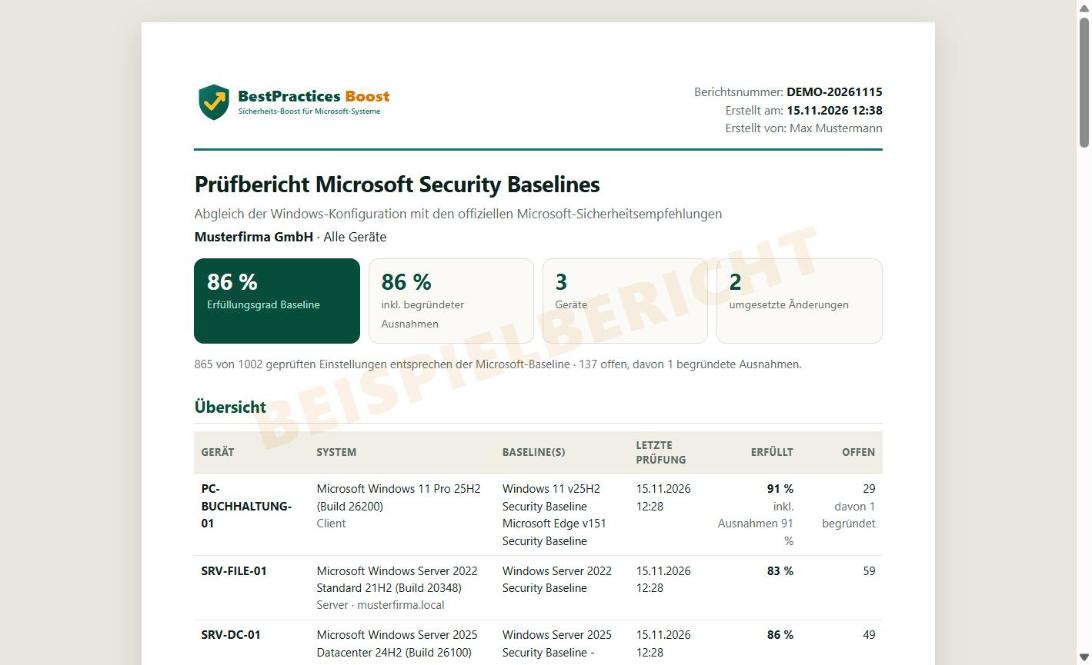
Cyber insurers, management, auditors and NIS2 ask about the state of the art. BestPractices Boost creates an audit report with one click: how far your systems meet the Microsoft Security Baselines, what deviates and why.
Not a Microsoft product – we deal exclusively with the Microsoft best practices.
What the audit report contains
Per device: system and role, checked baselines with version, compliance rate, all deviations with expected and actual value and risk, applied changes with date and user, and justified exceptions. Plus how many settings are enforced centrally by group policy.
Tamper-proof: report number and checksum
Every report is stored immutably and gets a report number and a SHA-256 checksum. Insurers or auditors can confirm authenticity at any time publicly at bestpractices-boost.com/pruefen.
Justified exceptions instead of silent gaps
Not every recommendation fits every line-of-business application. Document settings you deliberately do not apply with a reason – they appear separately in the report, with name and date. This shows the decision was made consciously.
For IT service providers: report per customer
In the Service provider plan you create audit reports per customer – devices of different customers are never mixed. Ideal as regular proof of your work.
FAQ
Does the audit report fulfil NIS2?
The report is one building block: it documents the hardening of your Windows systems according to vendor recommendations. NIS2 additionally requires risk management, reporting processes and contingency planning, among others – no single tool replaces that.
Which plans include the audit report?
In the Admin plan (€49 per month) and Service provider plan (€29 per user, min. 3 users – from €87 per month), incl. VAT. A sample report is available in the demo.
How does a third party verify authenticity?
Enter report number and checksum at bestpractices-boost.com/pruefen. If both match, it confirms that the report was created with BestPractices Boost and is unchanged.
More topics
Check the Microsoft Security Baselines automatically: expected vs. actual for Windows 11, Windows Server 2016–2025, Edge and Microsoft 365 Apps – updated daily, fix deviations with one click. Security baseline as GPO ›
Export Microsoft best practices as ready-made group policies: one GPO per role, PowerShell import into the domain or locally via LGPO – with a warning about what stays set after removal. For IT service providers (MSP) ›
For IT service providers: check and apply Windows hardening for all customers according to the Microsoft Security Baseline – customers kept separate, agent key per customer, audit reports as an extra service. From €87 per month. Current Microsoft Security Baselines ›
All currently loaded Microsoft Security Baselines with version and number of rules.
A must for every administrator and IT service provider.
Start the agent, view the result, apply best practices. It doesn't get any easier.