
Check the Microsoft Security Baseline – automatically, updated daily
Microsoft publishes a security baseline for every Windows version: hundreds of recommended security settings. BestPractices Boost compares your clients and servers against it, shows every deviation with expected and actual value and applies best practices on your instruction – with undo.
Not a Microsoft product – we deal exclusively with the Microsoft best practices.
What is the Microsoft Security Baseline?
The security baselines are Microsoft's official recommendations for secure settings of Windows 10/11, Windows Server, Microsoft Edge and Microsoft 365 Apps. Microsoft ships them in the Security Compliance Toolkit as group policy backups: registry values, account policies, user rights and advanced auditing. They are a minimum standard – ignoring them leaves known attack paths open.
The problem: checking manually takes days
Policy Analyzer, spreadsheets and gpresult: comparing a baseline by hand against a machine takes hours – per device, and again for every new baseline. New Windows versions bring new recommendations, and nobody tells you when a machine drifts again.
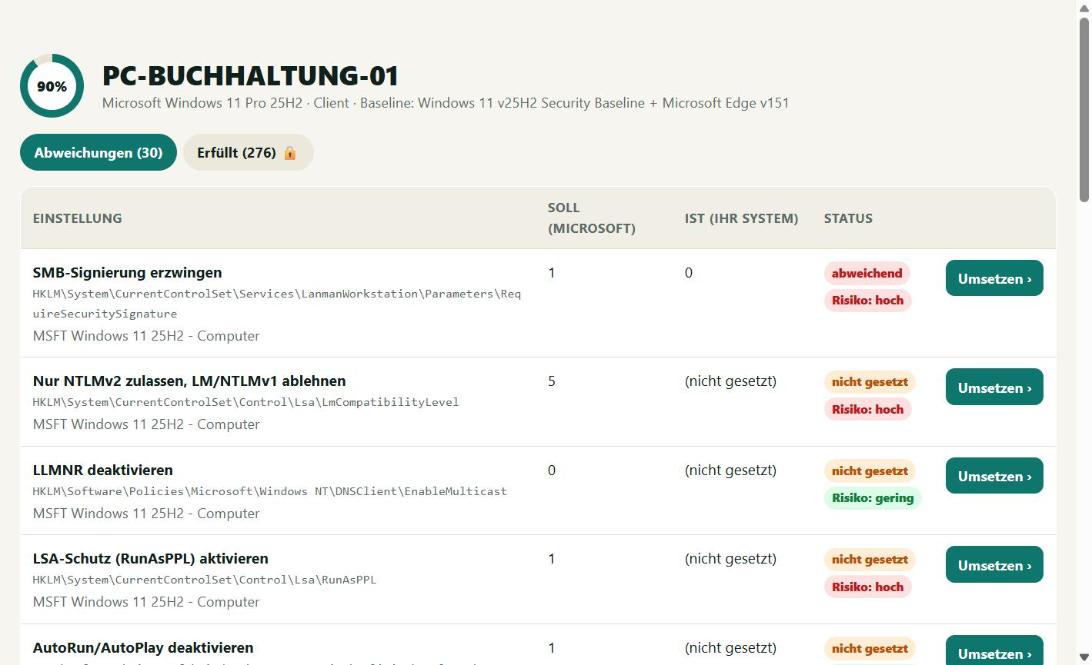
The solution: install the agent, see the result
The small Windows agent reads the actual values and reports them encrypted to the portal. BestPractices Boost downloads the latest Microsoft baselines daily, automatically picks the right one (client, member server, domain controller, Edge, Office) and shows compliance per device. New deviations arrive by e-mail.
Apply with honest warnings – and undo
For every setting BestPractices Boost explains what it does and which problems may occur. Changes are applied only after your confirmation; the previous value is backed up and can be restored with one click. Where that is technically not fully possible (e.g. UEFI-locked settings) you get an especially clear warning.
FAQ
Which Microsoft security baselines are checked?
Windows 10 22H2, Windows 11 (current versions), Windows Server 2016, 2019, 2022 and 2025 (member server and domain controller), Microsoft Edge and Microsoft 365 Apps for Enterprise. New baselines are picked up automatically every day.
Is the check free?
Yes. The free plan shows all deviations for up to 3 devices – no credit card. One-click apply, audit reports and unlimited devices start with the Admin plan.
Is a baseline complete security?
No. The baseline is a minimum standard – going below it is not an option. It does not replace updates, backups, antivirus or training. Responsibility for every change remains with the administrator.
More topics
Export Microsoft best practices as ready-made group policies: one GPO per role, PowerShell import into the domain or locally via LGPO – with a warning about what stays set after removal. Audit report for insurers & NIS2 ›
Audit report as PDF: compliance with the Microsoft Security Baselines per device, deviations, applied changes and justified exceptions – with report number and publicly verifiable checksum. For IT service providers (MSP) ›
For IT service providers: check and apply Windows hardening for all customers according to the Microsoft Security Baseline – customers kept separate, agent key per customer, audit reports as an extra service. From €87 per month. Current Microsoft Security Baselines ›
All currently loaded Microsoft Security Baselines with version and number of rules.
A must for every administrator and IT service provider.
Start the agent, view the result, apply best practices. It doesn't get any easier.