
A must for every administrator and IT service provider.Check Microsoft best practices – and apply them at the push of a button.
The security boost for Windows clients and servers: BestPractices Boost downloads the latest Microsoft Security Baselines every day, compares them with your actual settings and shows every deviation – protocols, policies, user rights, auditing.
- Free, no credit card
- Every change can be undone
- Servers in Germany
Not a Microsoft product – we deal exclusively with the Microsoft best practices.
For everyone responsible for Windows systems
Your own IT or your customers’ environments: if you look after Windows clients and servers, you need to know where they fall below the Microsoft minimum – and fix it fast.
For administrators
The person responsible for IT in their own company – often in charge of everything.
- See instantly which machines fall below the baseline
- Apply best practices one by one instead of Group Policy acrobatics
- Evidence for management, insurers and NIS2
- E-mail as soon as Microsoft publishes new best practices
For IT service providers
Managed service providers and freelancers looking after many customers.
- All customers kept separate in one portal
- Own agent key per customer, unlimited devices
- Several team members with their own login
- Security check as an extra service for your customers
The baseline is the minimum. Anything below is not acceptable.
Microsoft publishes a Security Baseline for every Windows version: several hundred recommended security settings. In practice only a fraction is applied on most machines – SMBv1, NTLMv1, missing signing and missing logging are classic entry points for ransomware.
GDPR (Art. 32) and NIS2 require measures according to the "state of the art". If you don't know and apply the vendor's publicly known recommendations, you have weak arguments after an incident – towards insurers, customers and authorities.
Ignoring known recommendations can be considered negligent.
BestPractices Boost shows you in black and white where your systems fall below the minimum – and brings them up to the baseline with one click.
That easy
Three steps – no group policy acrobatics, no Excel lists.
Start the agent
Download and run a small program. It detects whether it runs on a client, member server or domain controller and picks the matching Microsoft baseline.
See deviations
The portal shows target (Microsoft) and actual (your system) side by side – with traffic lights, explanation and risk rating.
Apply with one click
Pick a best practice, read the impact and possible problems, confirm – the agent applies it. Every change can be undone.
See BestPractices Boost in action
From the overview of all devices to the audit report – in a few clicks, with honest warnings and undo at any time.

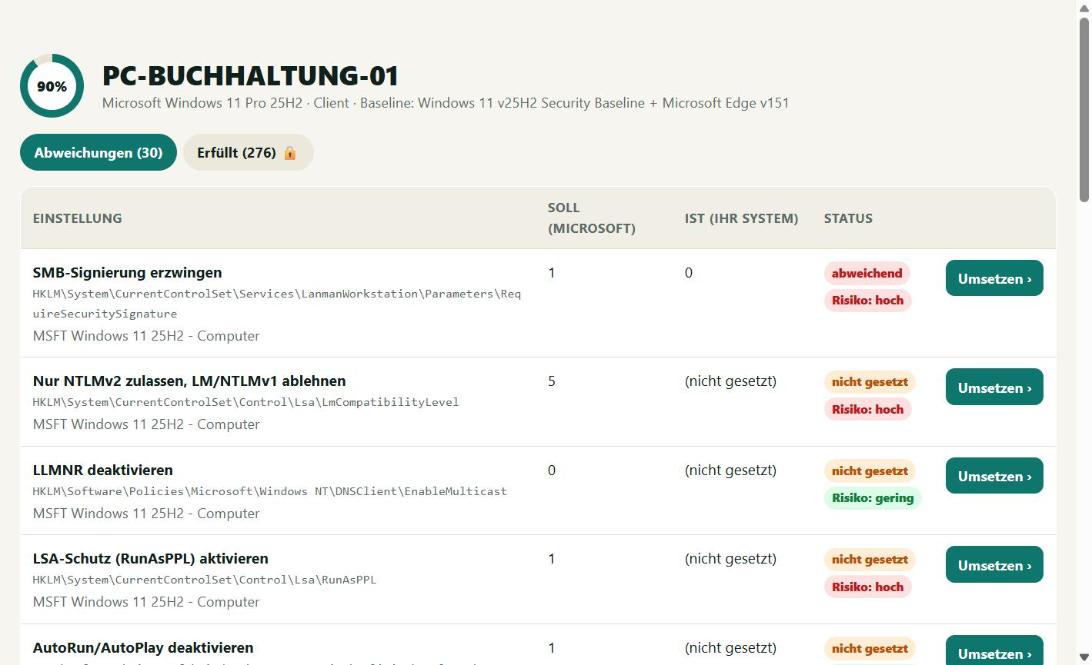
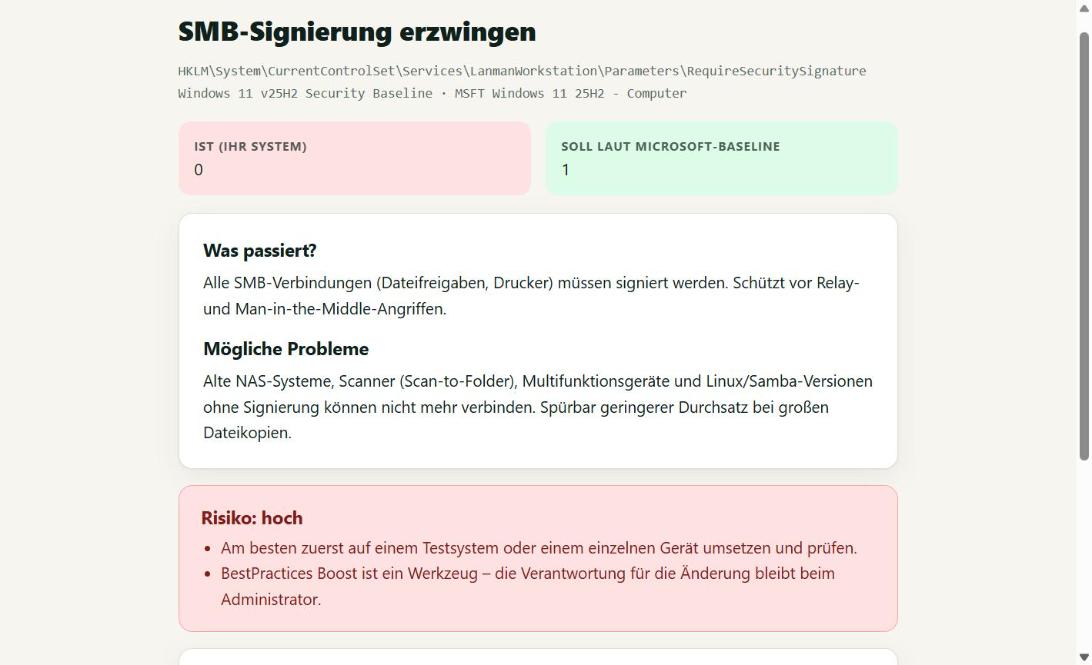


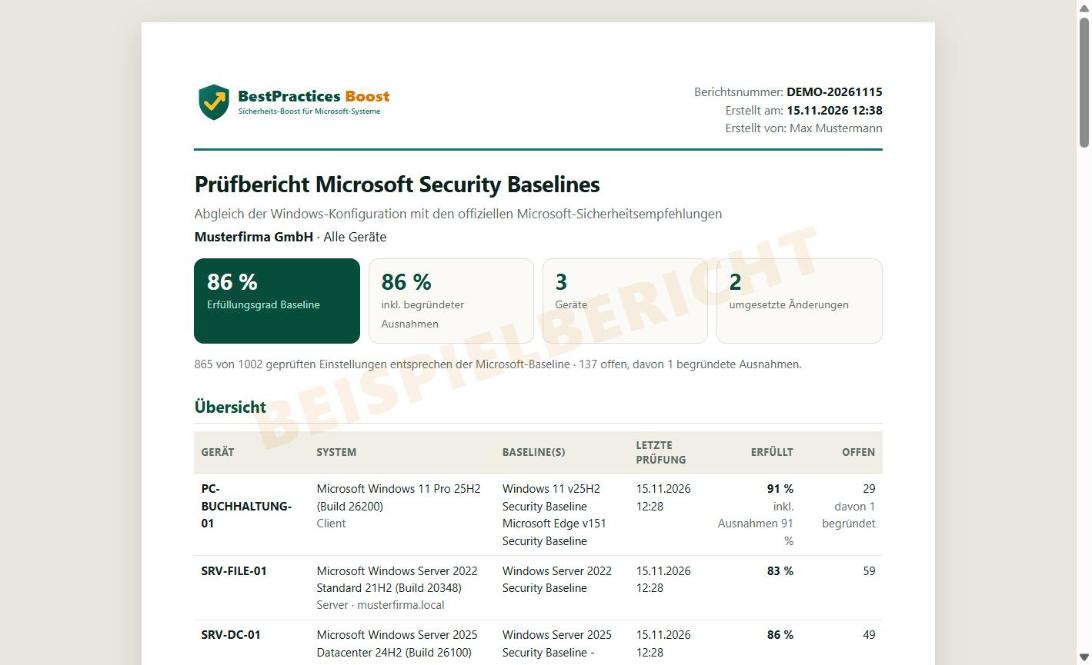
Everything you need
Updated daily
New Microsoft Security Baselines are searched for daily and imported automatically.
Alerts for new best practices
All agents report as soon as new best practices are not applied – you get an email.
Windows, servers, Edge and Office
Windows 10/11, Windows Server 2016–2025 (member servers and domain controllers), Microsoft Edge and Microsoft 365 Apps – one single agent.
Honest warnings
Before every change: what happens, which problems may occur and how high the risk is.
Always undoable
The old value is backed up and restored with one click. Where that is not fully possible, you get a special warning.
Self-updating agent
The agent updates itself as long as the account exists. Runs as a Windows service, outbound HTTPS only.
For service providers
Manage any number of customers separately – each with its own agent key.
Audit report as evidence
A PDF for insurers, management and NIS2 in one click – with report number, check value and justified exceptions.
Hosted in Germany
Servers in Germany. Only setting values are transmitted – no files, no documents.
Pricing
Cancel monthly. Billing by SEPA direct debit or card via Stripe.
Free
See where you stand.
- View all Microsoft best practices
- Target vs. actual values
- Up to 3 devices
- Deviations highlighted
- No one-click apply (view only)
Admin
For the person responsible for IT in your own company.
- Everything in "Free"
- Apply best practices with one click
- Warnings about impact and problems
- Undo and history
- Audit report as PDF (evidence for insurers, NIS2)
- 1 user, unlimited devices
Service provider
For IT service providers with several customers.
- Everything in "Admin"
- Manage different customers
- Multiple staff (min. 3 users)
- Separate agent key per customer
- Audit reports per customer as PDF
- Unlimited devices and customers
All prices net plus VAT. Business customers only (B2B). Service provider: minimum 3 users.
Checked against the official Microsoft Security Baselines
Source is the Microsoft Security Compliance Toolkit. Baselines are checked daily for new versions. Currently supported:
- Microsoft Edge v151 Security Baseline.zip (updated 2026-11-12 10:10)
- Microsoft 365 Apps for Enterprise 2512.zip (updated 2026-11-15 13:01)
- Windows 10 version 22H2 Security Baseline.zip (updated 2026-11-12 10:10)
- Windows 11 v26H2 Security Baseline v2.zip (updated 2026-11-12 10:10)
- Windows 11 v25H2 Security Baseline.zip (updated 2026-11-12 10:10)
- Windows 11 v24H2 Security Baseline.zip (updated 2026-11-12 10:10)
- Windows 11 v23H2 Security Baseline.zip (updated 2026-11-12 10:10)
- Windows Server 2025 Security Baseline - 2602.zip (updated 2026-11-12 10:10)
- Windows Server 2022 Security Baseline.zip (updated 2026-11-12 10:10)
- Windows 10 Version 1809 and Windows Server 2019 Security Baseline.zip (updated 2026-11-12 10:10)
- Windows 10 Version 1607 and Windows Server 2016 Security Baseline.zip (updated 2026-11-12 10:10)
Important: a baseline is not complete security
The Microsoft Security Baseline is a minimum standard – anything below is not acceptable, but it does not replace updates, backups, antivirus, a firewall concept or training. BestPractices Boost is a tool: it shows deviations and applies changes on your instruction. The administrator remains responsible for every change. But it will save you a lot of work and noticeably improve your security.
FAQ
Is this a Microsoft product?
No. BestPractices Boost is an independent product by itloesungen.net. We deal exclusively with the best practices (Security Baselines) published by Microsoft.
What exactly is checked?
All computer settings of the matching baseline: registry-based policies (e.g. SMB, NTLM, LSA, Defender, Remote Desktop), security options, password and lockout policies, user rights and advanced audit policy.
Which data is transmitted?
Computer name, Windows version and the values of the checked settings. No files, no documents, no user data.
What if a change causes problems?
Before each change the previous value is backed up. "Undo" makes the agent restore it. Where a full rollback is technically impossible (e.g. UEFI-locked settings) you get a special warning and an additional confirmation is required.
We have a domain with group policies – does it work?
Yes, the check shows the actual state. Note: if a group policy sets a value, it overrides local changes. Then the best practice belongs in the group policy – BestPractices Boost shows you which.
How often is it checked?
The installed agent syncs every 15 minutes. New baselines are searched for daily; new best practices that are not applied are reported by email.
What is the difference between the plans?
"Free" only displays. "Admin" (1 user) and "Service provider" (per user, min. 3) apply best practices with one click; service providers additionally manage different customers.
What does the agent need?
Windows 10/11 or Windows Server 2016 or newer with .NET Framework 4.8 (already included), administrator rights and outbound HTTPS access.
Are there dedicated baselines for domain controllers, database or Exchange servers?
Clients, member servers and domain controllers each get the matching Microsoft baseline – the agent detects the role itself. Microsoft currently publishes no dedicated security baseline for SQL Server, Exchange or IIS; these servers are checked against the member server baseline. That is exactly where the warnings and testing before applying pay off.
Can I present the result as evidence, e.g. to my insurer?
Yes. In the Admin and Provider plans you create an audit report as PDF in one click – per device or for all devices of a customer: compliance score, every deviation with target and actual value, applied changes and justified exceptions. Each report has a report number and a check value that third parties can verify at microsoft-best-practices.de/pruefen.
A must for every administrator and IT service provider.
Start the agent, view the result, apply best practices. It doesn't get any easier.